Commercial early access: built for production teams, still 0.x. Validate on staging first, keep your queue and provider setup healthy, and launch with confidence. Setup docs

Built for Laravel teams running Filament

Ship grounded AI assistants that work across your real channels.

Filament Agentic Chatbot gives you source-grounded bots, visual workflow orchestration, embeddable delivery, Telegram and Slack channels, API endpoints, analytics, and rollout operations in one coherent package.

Answers grounded in your own docs and data
Multiple bots from one Filament panel
Web widget, Telegram, and Slack
Analytics, budgets, and readiness checks

What ships today

A Filament-native assistant platform for production use.

Start with grounded answers, layer workflows where needed, and keep production visibility in one control surface.

Create assistants that answer from your own content.

Set up dedicated bots for support, sales, onboarding, and internal operations while each one keeps separate prompts, models, retrieval settings, and domain allowlists.

  • Per-bot provider and model governance
  • Source-backed retrieval with citation coverage
  • Context-area aware grounding and signed widget embeds

Turn conversations into explicit, reviewable flows.

Replace "single-prompt hope" with explicit branching logic, validations, and audit-ready action paths across support and pre-sales journeys.

  • Route by intent, confidence, or structured JSON output
  • Call backend actions and third-party APIs
  • Dry run, inspect traces, and publish controlled releases

Ship the same bot outside the panel.

The same bot config runs in Filament, public pages, and authenticated surfaces using one setup and one source of truth.

  • One runtime across public and authenticated surfaces
  • Per-bot branding, welcome copy, and accent
  • Source visibility and feedback hooks when enabled

Expose bots through controlled runtime access.

Use one assistant brain for website widgets, Telegram, Slack, and service-to-service integrations without duplicate prompt logic.

  • Scoped tokens with rate limits, budgets, and area policy
  • Webhook verification and end-to-end delivery events
  • Text-first output for reliability on lightweight channels

Operate the assistant like a product surface.

Move from demo to production with setup checks, trace logs, queue visibility, and privacy controls already built into the operational loop.

  • Traffic and citation coverage analysis
  • Feedback signals and knowledge-gap reporting
  • php artisan filament-agentic-chatbot:doctor
  • Conversation tracing and in-panel sanity checks

Ship responsibly with boundaries in place.

Control where, when, and how assistants answer with signed embeds, domain allowlists, URL safety checks, and privacy-first defaults.

  • Signed widget tokens for production
  • Conversation export and deletion endpoints
  • Safety guards for private and localhost targets
  • Trace redaction and API error hardening

Workflow evidence

The demo is built around real product surfaces.

This showcase is backed by seeded workflows, plugin records, and real widget settings instead of AI stock graphics.

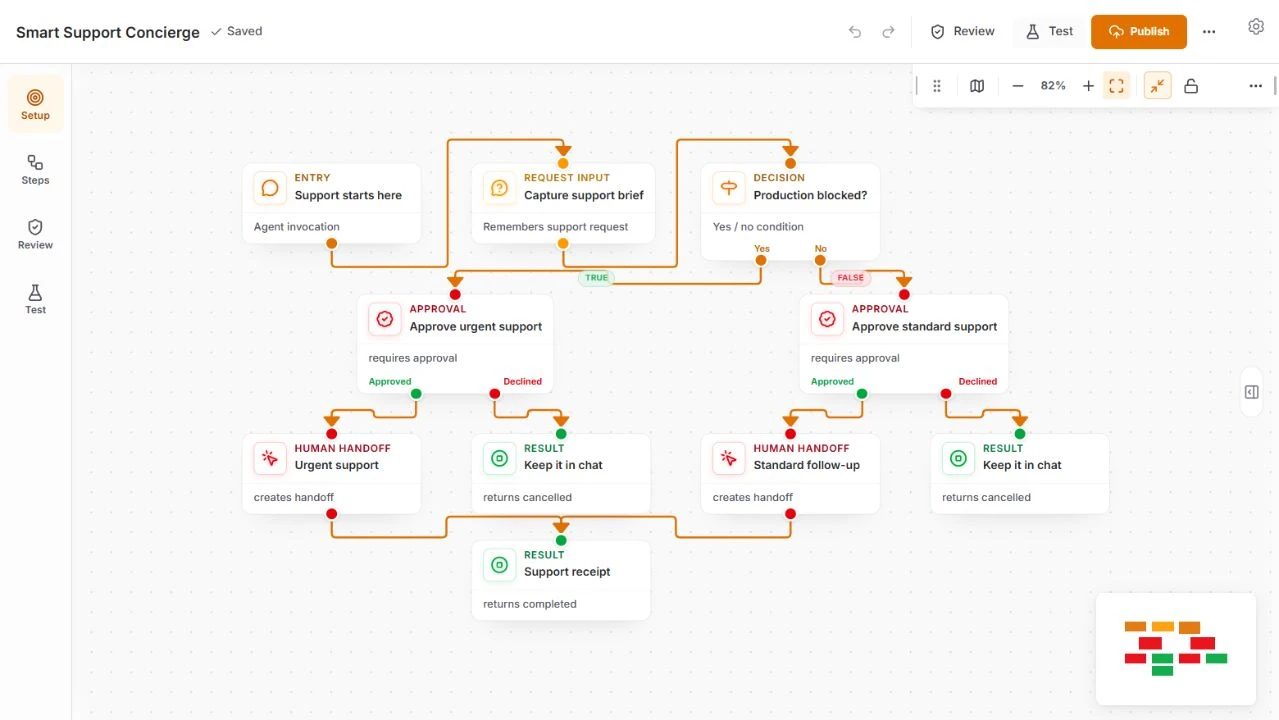
Agentic Showcase Command Center

The demo assistant routes each visitor path into the right workflow: submission QA, image generation, fit check, pricing guidance, and structured feedback capture.

The same pattern scales in real projects: explicit intent routing, source-aware answers, channel-safe handoffs, and testable branches that can be published only after they pass rollout checks.

Agentic Showcase Command Center workflow editor with routed node graph and intent inspector

Embeddable delivery

One assistant configuration, many surfaces.

The same bot runtime can power the Filament panel, public embeds, external channels, and backend API access without duplicating prompts. You configure once, then publish to production surfaces that already exist in your stack.

  • Signed tokens and domain allowlists for production embeds.
  • Theme-aware light/dark delivery with optional per-bot template and accent overrides.
  • Per-bot prompts, welcome copy, avatar, sources, and feedback controls stay centralized.
  • Workflows power routing for intake, scoring, and image workflows before escalation.
One runtime The same bot configuration can appear in the panel, floating widget, public embeds, and API access.
Theme control Inherit the host accent automatically or pin a specific widget template and accent color.

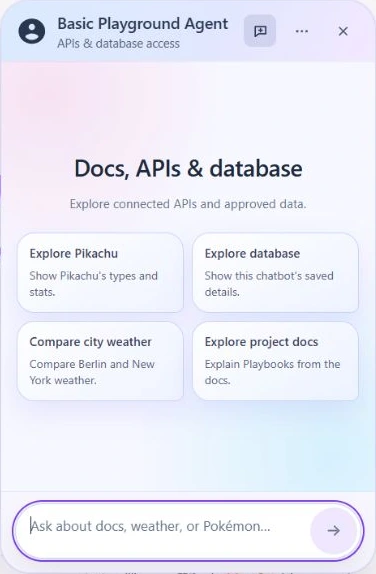
Embeddable AI chat widget for Laravel and Filament.

The public widget on this page is live. Its config comes from the same bot setup used in Filament: bot identity, domain policy, access token strategy, template, and visibility settings.

Public website embeds
Embed the same assistant on landing pages, documentation sites, product pages, help centers, and authenticated Laravel areas.
Light and dark mode
Inherit host CSS variables for theme-aware widget colors, or set explicit per-bot templates, accent colors, avatars, and welcome copy.
Workflow-powered answers
Route chats into workflow actions for qualification checks, image tasks, product fit evaluation, and structured feedback capture.
Production controls
Use signed embed tokens, domain allowlists, bot access tokens, source visibility, and feedback reporting for controlled public delivery.

This widget is loaded from the same package route you embed in a Laravel app. You configure the bot once in Filament and reuse it across websites, internal tools, and API-backed channels.

Open widget setup checklist

Realistic expectations

Production-minded, not over-promised.

The honest pitch is stronger: you can ship useful assistants today, but you still own the rollout, sources, queues, and authorization model.

This is a strong fit when

  • You already use Laravel and Filament.
  • You need source-grounded support, onboarding, internal knowledge, or lead qualification assistants.
  • You want workflows with human review points instead of unbounded automation.
  • You can validate the setup in staging before broad public rollout.

What this plugin does not replace

It accelerates assistant delivery, but it does not replace your product stack.

  • It does not replace billing, tenancy, auth, or business-specific authorization.
  • It does not invent good answers without good sources and configuration.
  • It is not a no-setup, set-and-forget platform.

Buyer evaluation

Validate the expensive parts before you buy.

The price is easiest to justify when you see how much admin UI, workflow runtime, widget delivery, channel plumbing, and operational tooling you do not have to build yourself.

Can it answer from our own content?

Use the live widget and demo panel to test source-backed answers, citations, ingestion status, and knowledge gaps before you put an assistant in front of customers.

Can it handle real product flows?

Evaluate lead qualification, support triage, implementation readiness, feedback capture, API handoffs, and workflow releases instead of judging the plugin by a generic chat prompt.

Can we operate it after launch?

Check Bot Access Tokens, signed embeds, domain allowlists, budgets, channel diagnostics, queue requirements, usage analytics, privacy endpoints, and trace controls as part of rollout planning.

FAQ

Questions serious Laravel teams ask before rollout.

These are the details that usually decide whether an embeddable AI chat widget stays a demo or becomes a maintained product surface.

What does Filament Agentic Chatbot add to a Laravel app?

It adds a production-minded control plane inside Filament: bot lifecycle, source ingestion, retrieval policy, workflow orchestration, access tokens, channel adapters, trace tooling, and analytics. You get the assistant as an actual product surface, not just a chat box.

Is it only an embeddable AI chat widget?

No. The widget is one surface among many. The same bot setup can be shared across the Filament panel, external channels, and backend API access, so you avoid maintaining a separate stack for each touchpoint.

Can I start with RAG before adding workflows?

Yes. Start with a single grounded bot, connect a reliable source set, and tune retrieval and citations first. Add workflows later where user journeys need branching, data capture, or action calls.

What do agentic workflows let me do?

They turn prompt behavior into a controlled graph with branch points, validations, API actions, and handoff logic. You can test every path, inspect traces, publish release versions, and roll back when a route starts to fail.

What do I need to run it?

PHP 8.3+, Laravel 12+, Filament 5.2+, a queue worker, an AI provider, and vector storage for RAG. PostgreSQL with pgvector is the recommended base; ChromaDB can work in smaller setups.

Can the widget be public-facing?

Yes. You can place it on pages, documentation, help centers, or authenticated Laravel areas. In production, pair signed embed tokens, allowlists, rate controls, and queue-backed processing with your privacy policy.

Can it connect to APIs, Slack, and Telegram?

Yes. Bot Access Tokens and connectors let you expose the same assistant through API integrations, Slack, and Telegram. The runtime keeps one conversation model and one operational surface for diagnostics.

What should I still own and validate?

You still own source quality, tenancy model, auth decisions, source refresh process, provider keys, billing, and incident response. The package helps you ship faster, but you still run the app and validate production rollout in staging.

Make the cost of your AI surface visible.

Try the demo panel, review the architecture, and compare this control plane against the time it takes to build each channel yourself.